
Tuesday, 9:47 p.m. A visitor has been on your product page for four minutes.
She scrolls. She opens the size chart. She goes back to the photos. She wants to know one thing: will it arrive before Saturday?
There is no one to ask. So she closes the tab.
Hi, I wanted to order the blue one last night, but I wasn't sure it would arrive by Saturday.
Never mind, I found one locally. Thanks anyway!
She was ready to buy. She had one question. And the answer came twelve hours too late.
A visitor with an unanswered question doesn't wait. She leaves, and she buys somewhere else.
I sell on WooCommerce myself. I know that email. A chat on your store fixes it, as long as you pick the right one.
Here are the 3 ways to add live chat to WordPress, from simplest to most complete. The first two are free to start. The third one keeps your site light and your brand on screen.
Method 1: A WhatsApp or email chat button (free, but your visitor leaves)
This is the quickest option. A floating button on your site opens WhatsApp, Messenger, a phone call or an email.
Two plugins dominate here. Joinchat is a WhatsApp button with 700,000+ active installs on WordPress.org. Chaty offers buttons for 25 channels, with 300,000+ installs and a 5.0 rating. Both are free, quick to set up, and your customers already know WhatsApp.
How to add it
- Install a button pluginFrom Plugins, Add New, search for a WhatsApp or “click to chat” plugin.
- Enter your number or addressYour WhatsApp number, your Messenger page, or your email.
- Pick the icon and positionBottom right, your color, and you are live.
What your visitor really sees
Here is the catch. The click doesn't open a chat on your store. It opens WhatsApp. On a phone, the visitor jumps to the app. On a computer, Joinchat shows a QR code to scan with a phone.
Either way, your visitor has left your product page, at the exact moment she was hesitating. She also has to give you her phone number to ask a simple question.
And on your side? You answer from your personal phone, far from your orders. At night or on weekends, nothing tells the visitor when you will be back.
What works
- Free, set up in two minutes
- Your customers already know WhatsApp
- Light on your pages
What hurts
- Your visitor leaves your store to ask
- You answer from your personal phone
- No history next to your orders
- Nothing to say “we're offline, back tomorrow”
Bottom line: fine for a local shop with a few questions a week. For an online store, it sends buyers away at the exact moment they hesitate.
Method 2: A free chat app like Tidio or tawk.to (free to start, then on their terms)
This is the classic choice. A hosted chat platform that you plug into WordPress with its plugin or a snippet of code.
These tools are powerful, and that's their strength. Tidio (70,000+ installs) offers an AI chatbot and one inbox for live chat, Messenger, Instagram and email. tawk.to (100,000+ installs) is free with no limit on agents, chats or sites, and has apps for iOS, Android, Windows and Mac. Crisp and LiveChat are two other well-known names, compared in the table below.
How to add it
- Create an account with the vendorOn their website, with your email.
- Install their pluginOr paste their code into your theme, then link your account.
- Answer from their dashboardOn their website or in their mobile app, not in WordPress.
What it loads on every page
A hosted widget adds a script from another website to every page of your store. Product pages and checkout included.
Google itself flags it. Its performance guide says: “Most chat widgets download significant amounts of JavaScript that can negatively affect page load and responsiveness to user input” (web.dev). Its page speed tool, Lighthouse, lists live chat among the third-party resources to load later, with a facade.
So we measured it ourselves, on October 20, 2026. Each vendor's own homepage, in Chrome, widget closed, after 20 seconds without a click.
| Chat app | Downloaded by the closed widget | Of which JavaScript |
|---|---|---|
| Tidio | about 526 KB | 388 KB (1.06 MB once unpacked) |
| LiveChat | about 370 KB | about 367 KB (1.19 MB once unpacked) |
| tawk.to | about 265 KB | 221 KB (606 KB once unpacked) |
| Crisp | about 131 KB | 92 KB (310 KB once unpacked) |
Compressed transfer size of the widget's own files, one measurement each, fonts and sounds included. Your store may load a bit more or less depending on its settings.
Does a few hundred KB ruin a store? No. But it's added to every product page, for every visitor, including those who will never open the chat. If your whole store feels slow, the chat is rarely the only cause: run a full check-up of a slow WordPress site.
The free plan, and what comes next
Free plans are real, but they come with conditions. According to each pricing page on October 20, 2026:
- Tidio: free for 50 billable conversations a month, with “Powered by Tidio” on the widget. Starter costs $29 a month, or $24.17 a month billed yearly. Removing the branding is an add-on on the Growth plan.
- tawk.to: completely free, but “Powered by tawk.to” stays unless you pay $29 a month.
- Crisp: free for 2 seats, with a “We run on Crisp” watermark. Paid plans start at $45 a month per workspace, and the watermark goes away on Plus, at $295 a month.
- LiveChat: no free plan, a 14-day trial, then $25 per agent per month ($19 billed yearly). A white-label widget is reserved for Enterprise.
In short, your store advertises someone else's brand until you pay. And the price follows your team or your volume.
Where your conversations live
With any hosted chat, messages are stored by the vendor, who acts as your data processor. Tidio says it processes data mainly in the EEA, with possible transfers to the US. tawk.to processes everything in the United States. Crisp stores data in Amsterdam. LiveChat lets you choose the EU or the US at sign-up.
This is normal for any hosted tool, ours included. If you sell in the EU or the UK, just check two things before you install: a data processing agreement, and what the widget stores in the visitor's browser. The UK regulator explains when that needs consent in its guidance on storage and access technologies.
What works
- Powerful, with mobile apps
- AI chatbots and multichannel inboxes
- A free plan to start
What hurts
- A heavy third-party script on every page
- Their logo on your store until you pay
- One more dashboard to open
- A price that grows with your team or your volume
Bottom line: great if you need a support platform. For a small store, you often get a big tool, and a big script, to answer a few questions a day.
Method 3: A light chat plugin that lives in your WordPress admin (Plume Chat)
What if the chat looked like your store, answered from WordPress, and loaded almost nothing? That's the idea behind Plume Chat.
How to add it
- Start your free trial7 days, then one subscription for every Plume plugin.
- Install Plume ChatAnd activate your license.
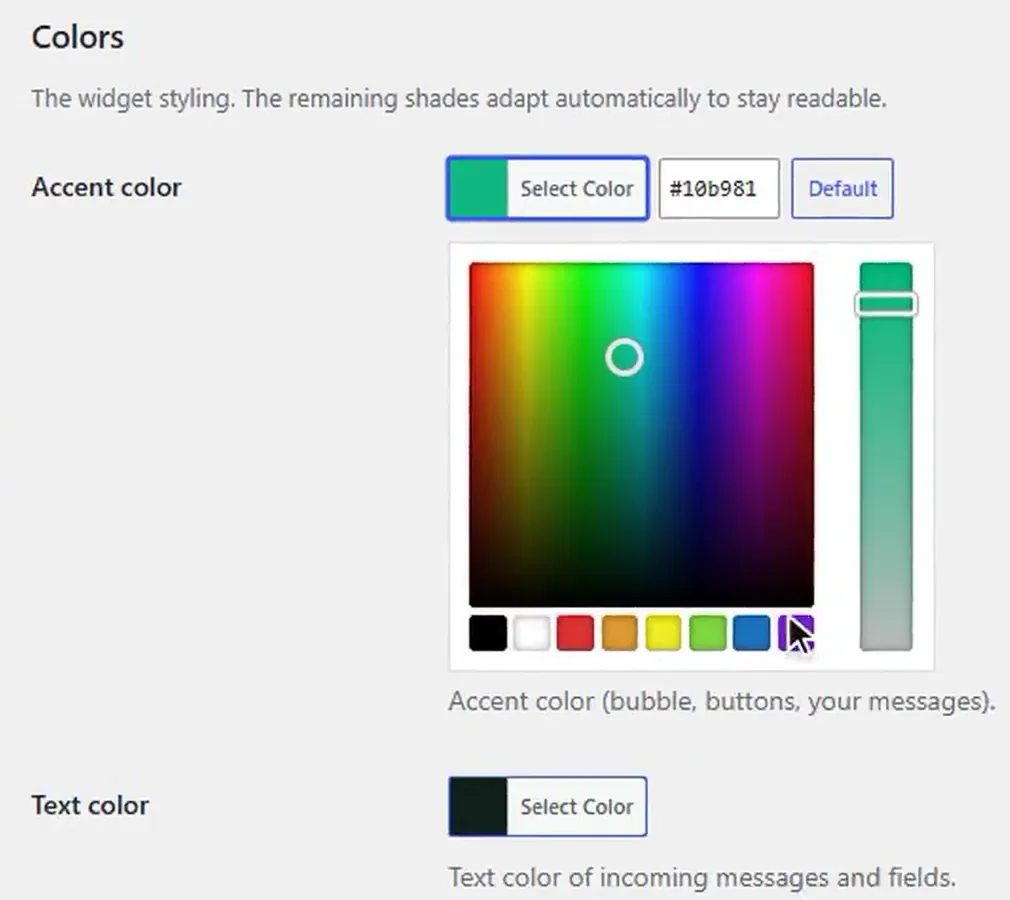
- Turn it onIn Plume, Chat, Settings, tick “Enable the chat widget”, then set your name, photo, colors and hours.
A. Your brand, not ours
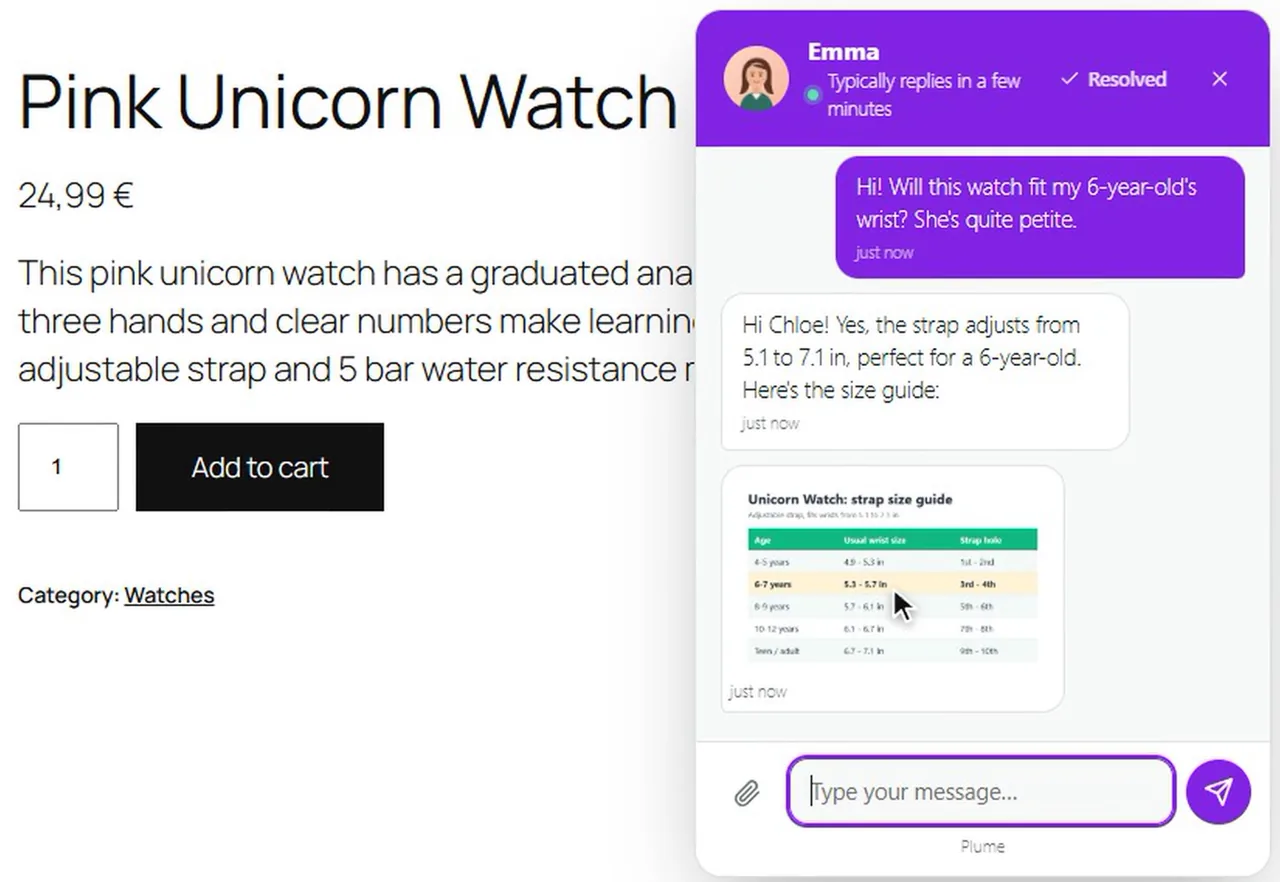
You pick the accent, text and background colors. You add your name and photo, a welcome message and a subtitle. The widget labels come in English or French.
Your visitors see your brand, nothing else. No “Powered by” line to remove, at any price.
B. Reply from WordPress, never miss a message
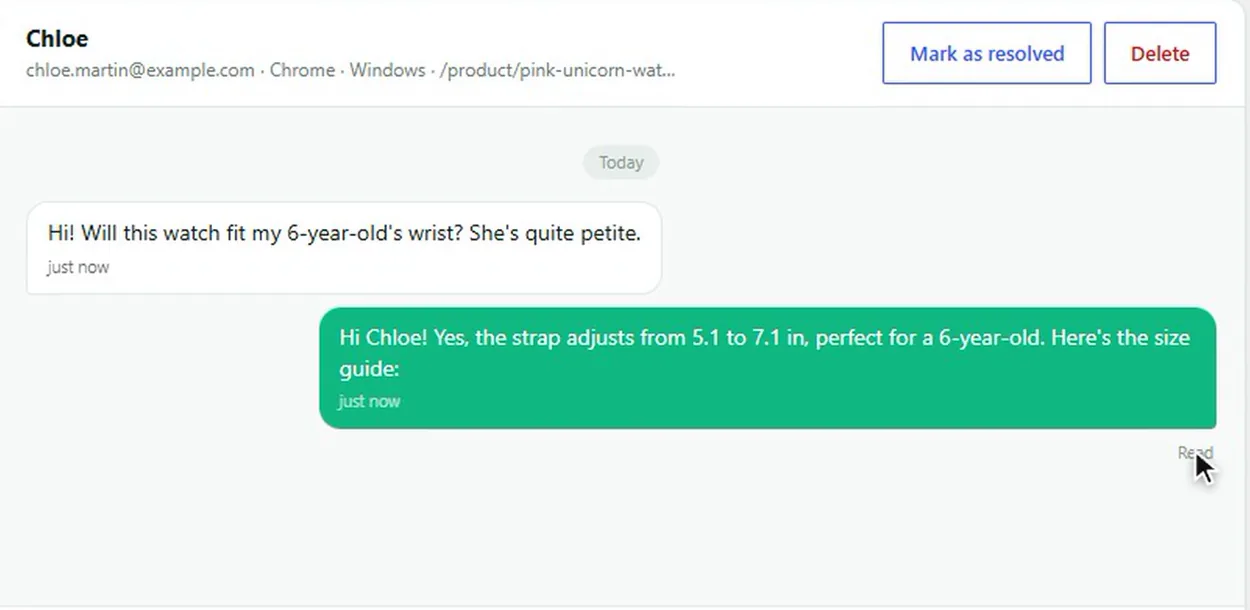
Every conversation lands in the Conversations tab, in Plume, Chat. The list is on the left, the thread on the right. You exchange text and images, and you see when your reply is “Delivered”, then “Read”.
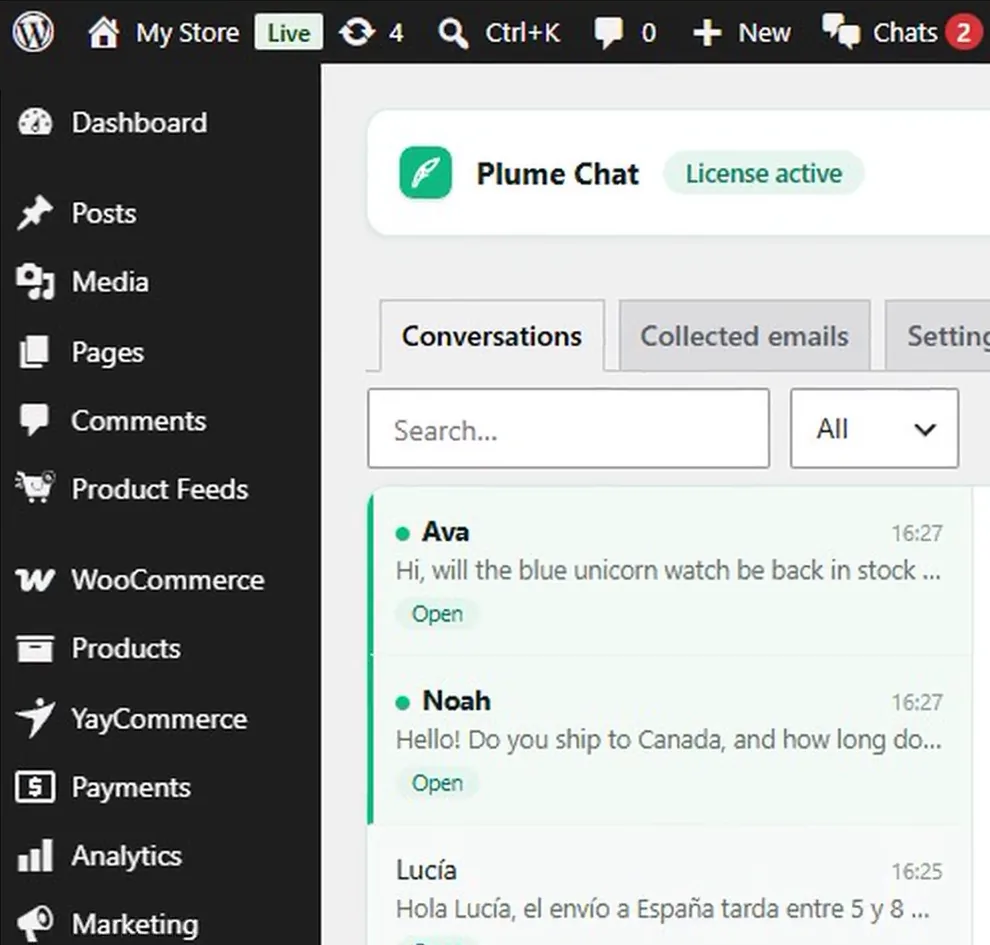
And you won't miss a message. A sound plays and a red counter appears in the Plume menu and the admin bar, even while you browse your own site. Turn on browser notifications, and you are alerted from any tab. If a message stays unanswered, an email alert goes to the address of your choice.
C. Built for stores: opening hours, greeting, promo code
Many store questions come before the purchase: size, delivery time, payment. Plume Chat was made for those moments.
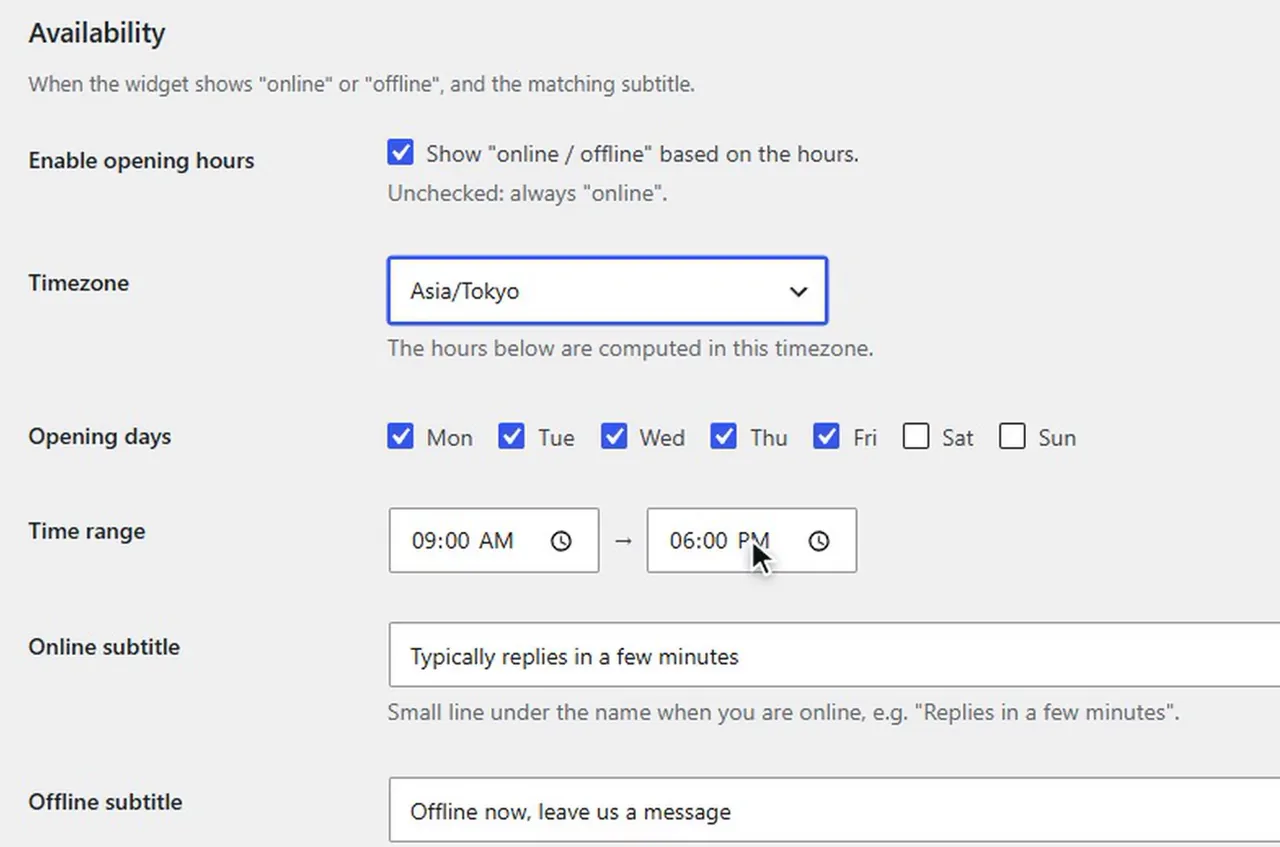
- Opening hours: you set your days and hours in your time zone. The widget switches online and offline by itself, and invites visitors to leave a message when you're away. As soon as you are active in the inbox, you show as online.
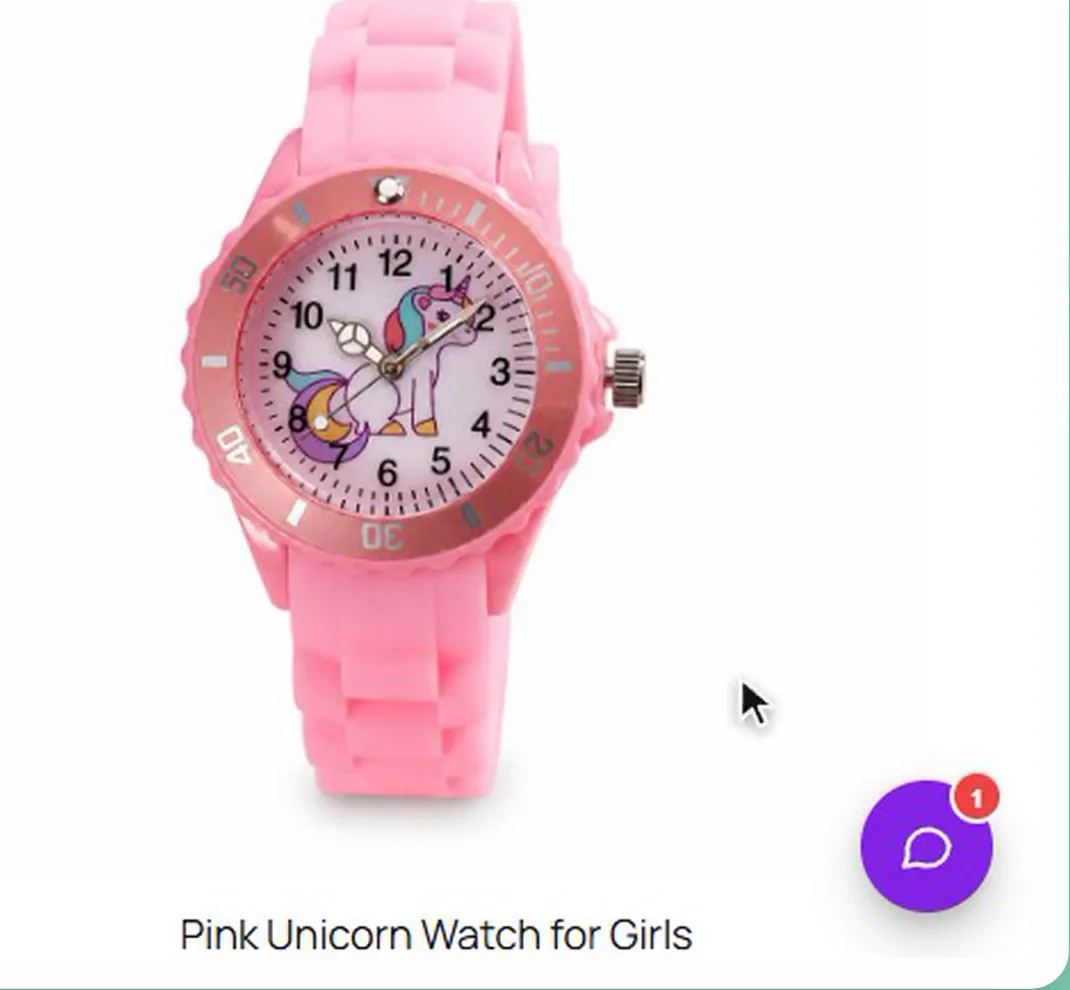
- A gentle greeting: after a delay you choose, a “1” badge appears on the bubble, once per visit, with your welcome message or an offer.
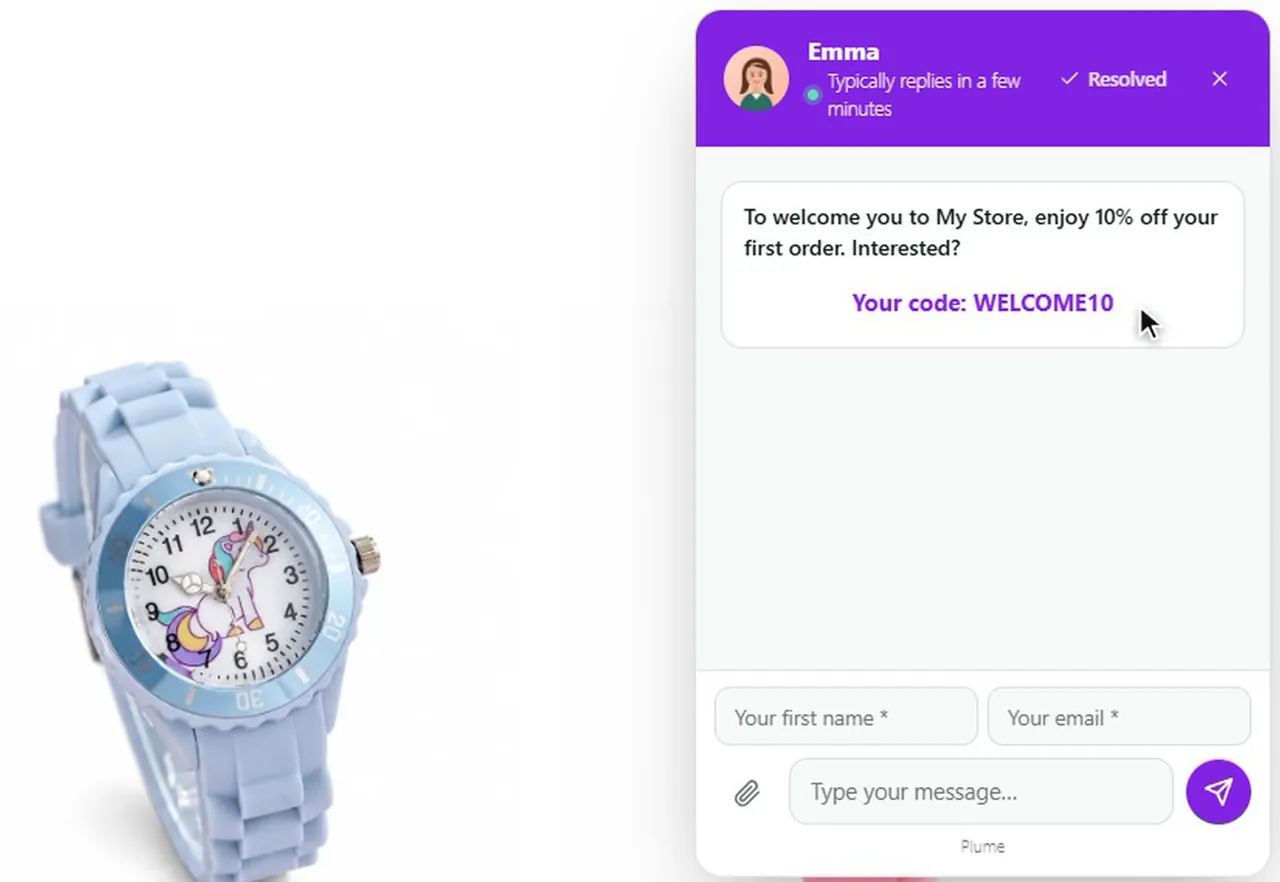
- A promo code on arrival: the visitor gets a welcome discount, revealed once she leaves her email. Emails are collected in a tab, and exported to CSV in one click.
And since many of those questions are about deliveries, you can also cut “where is my order?” questions with a real tracking page.
D. Better replies, in your customer's language
Typed a quick reply between two parcels? Click “Rewrite with AI”. Your reply becomes warmer, clearer or more professional, with the same meaning. Pick one of 7 languages, and it's written in your customer's language.
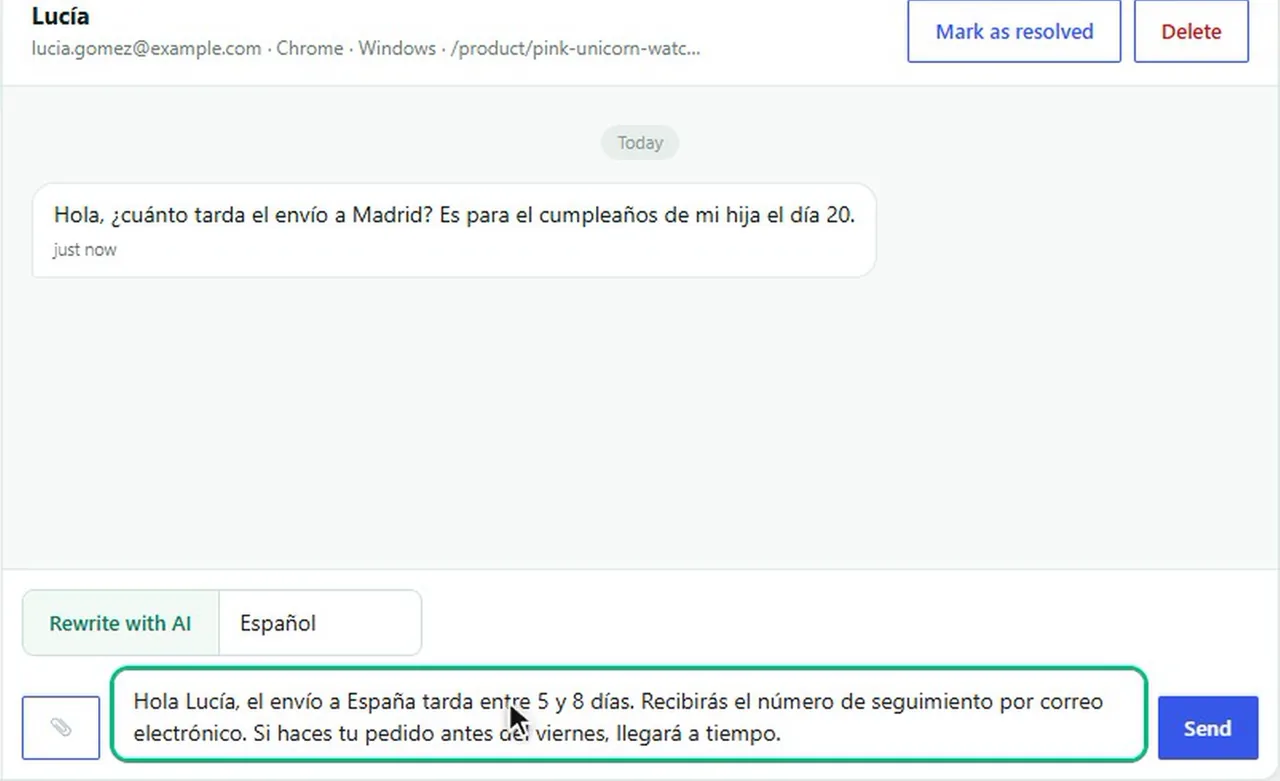
To be clear, Plume Chat is a live chat, not a robot. AI only rewrites your own reply. If you want a bot that answers alone at 3 a.m., or one inbox for WhatsApp, Instagram and email, a chat platform from method 2 is the better fit.
E. Light on purpose
Plume Chat is built with no framework and no jQuery. Your visitors download a single script: about 13 KB compressed (50 KB unpacked), plus the agent's photo. We measured it on October 20, 2026, by downloading the file from a live test store. Compare with the table in method 2.
As for privacy, conversations are processed by Plume on your behalf, as a data processor. They are deleted automatically 90 days after their last activity, images included.
What it costs
Plume Chat is included in every Plume plan, from €29 a month, with every other Plume plugin. Receiving and reading messages costs nothing. Only your first reply in a conversation uses 1 credit, and never again on that conversation. The first plan includes 1,000 credits a month and up to 10 sites. And you can try it free for 7 days, then cancel anytime.
What works
- Your colors, your name, no third-party logo
- Replies from WordPress, with alerts
- Opening hours, greeting and promo code built in
- One small script, about 13 KB
- One subscription for every Plume plugin
What hurts
- No mobile app: you reply from your WordPress admin, with browser alerts
- No bot that answers on its own
Bottom line: with methods 1 and 2, the chat belongs to someone else. With method 3, it's part of your store.
That's exactly what our WordPress live chat plugin does.
Plume's take: which WordPress chat plugin should you choose?
There is no single best chat plugin. There is the one that fits your store.
- A few questions a week, local customers: a WhatsApp button (method 1) is enough. Keep your money.
- A support team, several channels, a bot at night: a chat platform (method 2), with the budget that goes with it.
- A WooCommerce store that wants answers before purchase, in its own colors, without a heavy script: Plume Chat (method 3).
- Already a Plume subscriber: it's already included. Turn it on.
| Tool | Free plan | Paid from | Branding on free plan | Conversations stored | Measured weight |
|---|---|---|---|---|---|
| Joinchat (button) | Yes | €96/year (Premium) | Shown by default, can be turned off for free | In WhatsApp, nothing on your site | about 9.5 KB* |
| Chaty (buttons) | Yes, 25 channels | $59/year (Pro) | None found | In each channel's app | about 36.5 KB* plus jQuery |
| tawk.to | Yes, unlimited agents | $29/month to remove branding | “Powered by tawk.to” | United States | about 265 KB |
| Tidio | Yes, 50 conversations/month | $29/month (Starter) | “Powered by Tidio” | Mainly EEA, possible US transfers | about 526 KB |
| Crisp | Yes, 2 seats | $45/month per workspace | “We run on Crisp” | Europe (Amsterdam) | about 131 KB |
| LiveChat | No, 14-day trial | $25 per agent/month | White-label on Enterprise only | EU or US, chosen at sign-up | about 370 KB |
| Plume Chat | No, 7-day trial | €29/month, every Plume plugin included | None, ever | Processed by Plume, deleted 90 days after last activity | about 13 KB |
Prices and limits from each vendor's pricing page on October 20, 2026 (Joinchat, Chaty, tawk.to, Tidio, Crisp, LiveChat). Weights measured by Plume on the same day, compressed. *Button plugins: estimated from their WordPress.org files.
The best chat is the one your visitor uses before she closes the tab.
Back to Laura and her Saturday. With a chat on your product page, she gets her answer in a minute. And you get the order, not the “never mind” email the next morning.
 Plume TrackingFewer delivery questions in the chat: customers track their parcel on your store.
 WooCommerce order tracking3 ways to stop “where is my order?” emails.
Frequently asked questions
How do I add live chat to my WordPress site?
Install a chat plugin, connect it if the tool asks for an account, and turn the widget on. With Plume Chat, you install the plugin, activate your license, then tick “Enable the chat widget” in Plume, Chat, Settings.
What is the best free chat plugin for WordPress?
It depends on what you need. For a few questions a week, a free WhatsApp button like Joinchat is enough. For a real chat at no cost, tawk.to is free with unlimited agents but shows its branding, and Tidio's free plan covers 50 conversations a month, according to their pricing pages in October 2026.
How much does live chat cost?
From nothing to a price per agent. Free plans exist but usually show the vendor's logo. Paid plans we checked in October 2026 start at $29 a month for Tidio, $45 a month for Crisp and $25 per agent per month for LiveChat. Plume Chat is included in every Plume plan, from €29 a month with every Plume plugin.
Does a live chat slow down WordPress?
Every chat widget adds a script to your pages, so the real question is how much. On October 20, 2026, we measured between about 131 KB and 526 KB for the closed widget of four popular chat apps, and about 13 KB for the Plume Chat script.
Live chat or chatbot: what is the difference?
With live chat, a person answers. With a chatbot, software answers on its own. Plume Chat is a live chat: you answer, and AI can only rewrite your own reply before you send it.
Is there a free alternative to Tidio for WordPress?
Yes. tawk.to is free with no limit on agents or chats, with its branding shown, and Crisp has a free plan for 2 seats, according to their pricing pages in October 2026. Plume Chat is not free, but it is included in the Plume subscription with every other Plume plugin.
Do I need a cookie banner for a live chat?
It depends on the tool and on where your customers are. In the EU and the UK, storing or reading information on a visitor's device needs consent unless it is strictly necessary for a service they ask for. Ask your chat provider what its widget stores.
Does Plume Chat work with WooCommerce?
Yes. Plume Chat works on any WordPress site, WooCommerce store or not, with WordPress 6.0 or later and PHP 8.0 or later.
I build lightweight WooCommerce plugins out of what I run into with my own online stores. Plume is the essentials of a store, without the bloat.